|
|
| 1번째 줄: |
1번째 줄: |
| <p>
| | [[파일:Config-im 0.png]] |
| 画像左側のリストをクリックすると、それぞれの解説ページへ移動します。
| |
| <br /><img src="image/config-im/0.png" usemap="#configdialog" width="557" height="590" alt="本体設定ダイアログIM" />
| |
| <map name="configdialog" id="configdialog">
| |
| <area shape="rect" coords="14,31,137,46" href="config-ippan.html" alt="一般" />
| |
| <area shape="rect" coords="14,47,137,66" href="config-ghost.html" alt="ゴースト(1)" />
| |
| <area shape="rect" coords="14,66,137,82" href="config-ghost2.html" alt="ゴースト(2)" />
| |
| <area shape="rect" coords="14,82,137,98" href="config-folder.html" alt="フォルダ" />
| |
| <area shape="rect" coords="14,98,137,114" href="config-disp.html" alt="表示" />
| |
| | |
| <area shape="rect" coords="14,115,137,133" href="config-talk.html" alt="喋り/バルーン" />
| |
| <area shape="rect" coords="14,134,137,152" href="config-conn1.html" alt="接続(1)" />
| |
| <area shape="rect" coords="14,150,137,168" href="config-conn2.html" alt="接続(2)" />
| |
| <area shape="rect" coords="14,167,137,185" href="config-pop.html" alt="POP" />
| |
| <area shape="rect" coords="14,184,137,202" href="config-extprog.html" alt="外部アプリ" />
| |
| | |
| <area shape="rect" coords="14,201,137,219" href="config-im.html" alt="IM" />
| |
| <area shape="rect" coords="14,218,137,236" href="config-ipmes.html" alt="IPMessenger" />
| |
| <area shape="rect" coords="14,235,137,253" href="config-i18n.html" alt="国際化" />
| |
| <area shape="rect" coords="14,252,137,270" href="config-dev.html" alt="開発/その他" />
| |
| </map>
| |
| </p>
| |
|
| |
|
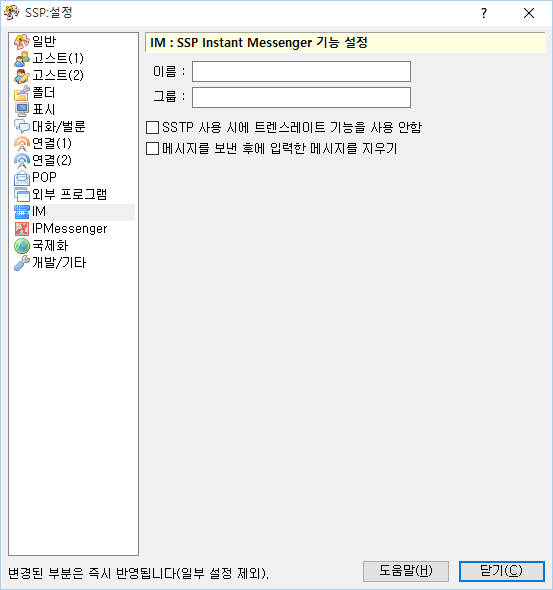
| このページでは右クリックメニューの「設定」サブメニューにある項目「本体設定」で開くダイアログの、「IM」ページについて解説しています。 | | このページでは右クリックメニューの「設定」サブメニューにある項目「本体設定」で開くダイアログの、「IM」ページについて解説しています。 |
このページでは右クリックメニューの「設定」サブメニューにある項目「本体設定」で開くダイアログの、「IM」ページについて解説しています。
SSP独自のSSTPかIP Messengerを使ったインスタントメッセンジャ機能の設定です。
各項目の解説
- あなたのハンドル名等、インスタントメッセンジャで使用する名前を入力してください。
- インスタントメッセンジャで利用するグループ名です。
- SSTP通信でSakuraScriptを送信する場合に、「トランスレート」と呼ばれるゴースト内部で文字を変換する機構を無視して、直接SakuraScriptを再生します。通常はチェックする必要はありません。
- メッセージを送信後、メッセージ入力枠に入力した文字列を消去します。
下部のボタン
- 本体設定ダイアログの、設定中のページのヘルプ(つまりこのページ)を開きます。
- ダイアログ右上の「?」マークも同様です。
- 本体設定ダイアログを閉じます。
- ダイアログ右上の「×」マークも同様です。
본 페이지의 내용은 ukadoc 프로젝트의 SSP 매뉴얼을 번역한 것에 기반합니다.
본 페이지의 내용의 라이선스는 Creative Commons by 라이선스가 적용됩니다.
"UKAGAKA" System Documentation Project SSPマニュアル


